
Step 3: Connect to the App
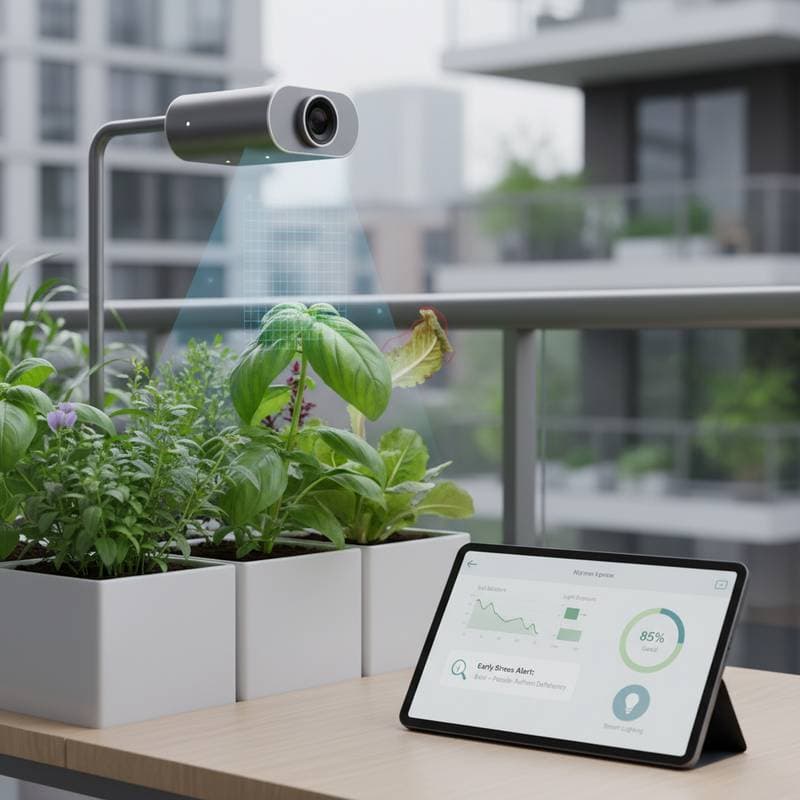
Download the dedicated companion application for the camera from your device's app store. Proceed through the pairing instructions to integrate the device with your home Wi-Fi network. Establish a strong password for security and assign descriptive names to each camera based on its position, for instance, "Herbs by Window" or "Tomatoes North Bed."
After establishing the connection, configure alert thresholds within the app settings. You might program notifications for soil moisture levels falling below 25 percent or leaf temperatures exceeding 85°F (29°C). These custom settings ensure timely interventions tailored to your garden's specific needs.
Step 4: Calibrate and Test
Initiate a calibration phase lasting 24 to 48 hours to align the camera's readings with actual conditions. During this period, cross-reference the app's reports against visual inspections of your plants. If the system indicates yellowing leaves while you observe vibrant green foliage, fine-tune the color sensitivity options in the settings menu.
Many applications incorporate adaptive learning features that refine accuracy over time as you validate or override alerts. Document any discrepancies during testing to inform adjustments. This initial effort establishes a reliable baseline for ongoing monitoring.
Step 5: Review Data and Take Action
The application compiles daily snapshots alongside trend charts to visualize plant performance. Examine these visuals for emerging patterns that reveal underlying issues. For example, a steady decline in soil moisture could indicate excessive drainage from the potting medium.
Frequent alerts for leaf curling during midday hours often point to excessive direct sunlight exposure. Sudden notifications about pests might reveal an infestation originating from a nearby area. Address these insights through targeted responses, such as relocating the plant to a shadier spot, applying shade cloth, or replenishing mulch to retain soil hydration.
Focus on incremental modifications rather than sweeping changes. Track the outcomes of each adjustment in the app's log to build a record of effective strategies. Over time, this approach minimizes plant stress and enhances overall garden resilience.
Safety Tips
- Inspect power cords on a monthly basis for signs of wear or fraying, and replace any compromised components immediately to prevent hazards.
- Position devices in locations sheltered from direct moisture, such as under eaves or within protective enclosures, to safeguard electronics.
- Steer clear of applying chemical sprays in proximity to sensors or lenses; instead, use a soft cloth dampened with mild soap for cleaning.
- Disconnect the power source prior to any repositioning or maintenance activities on the camera.
- Enable two-step verification within the app to secure access to your data and live feeds.
Adhering to these practices not only prolongs the equipment's durability but also fortifies the privacy of your network and garden observations.
Troubleshooting
The Camera Disconnects Often
Signal interruptions frequently stem from distance or environmental barriers. Relocate your Wi-Fi router nearer to the garden area or install a range extender to bolster coverage. Dense walls or metallic structures can interfere with transmission; consider these factors when planning placement.
Additionally, lowering the video resolution in the settings can decrease bandwidth demands and stabilize connections. Test the setup in various conditions to identify optimal configurations. Persistent issues may warrant consulting the manufacturer's support resources for advanced diagnostics.
The App Gives False Alerts
Inaccurate notifications often arise from variable lighting or sensor misalignment. If alerts flag yellow leaves due to shifting shadows, dial back the sensitivity parameters or adjust the camera's angle for better consistency. Stable illumination throughout the day supports more precise AI interpretations.
Recalibrate during periods of typical light exposure to minimize errors. Review alert history to discern patterns in false positives, then refine thresholds accordingly. This iterative process hones the system's reliability for your unique environment.
The Lens Fogged Overnight
Humidity fluctuations commonly cause lens condensation, particularly in damp climates. Gently wipe the surface with a lint-free cloth each morning to restore clarity. For models permitting access, insert a silica gel packet within the housing to absorb excess moisture.
Prevent recurrence by selecting cameras with anti-fog coatings or sealed designs. Monitor weather patterns and adjust indoor humidity controls if plants reside in controlled spaces. Regular vigilance ensures uninterrupted image quality.
The Battery Drains Too Quickly
Rapid depletion typically results from continuous recording modes. Transition to motion-activated or scheduled snapshot intervals to conserve energy, potentially extending runtime by 30 to 50 percent. Review power usage statistics in the app to pinpoint inefficient settings.
Opt for solar-compatible models in sunny locations to supplement battery life. Charge fully before deployment and avoid extreme temperatures that accelerate drain. These optimizations maintain consistent performance without frequent interventions.
Maintenance
AI garden cameras require minimal routine care, yet consistent attention ensures precise data capture. Dedicate time each week to the following tasks to sustain operational excellence.
- Wipe the lens with a microfiber cloth to remove dust or residue that could obscure views.
- Verify alignment following weather events like high winds or heavy rain, which might shift positioning.
- Install firmware updates as notifications appear; these enhancements refine AI algorithms for better detection.
- Examine seals and casings seasonally for any developing cracks or wear that could invite moisture.
- Monitor battery levels and recharge or swap units promptly to eliminate monitoring interruptions.
Such brief inspections, often completed in under ten minutes, avert inaccuracies and extend device longevity. Integrate them into your weekly garden routine for seamless integration.
Storage
When transitioning cameras indoors for winter storage, select a cool, dry container to house the unit alongside neatly coiled cables. Clean all surfaces thoroughly before packing to prevent contaminant buildup. Maintain batteries at a 40 to 60 percent charge level to optimize longevity during inactivity.
Affix labels to accessories for effortless retrieval and reinstallation in the spring. For setups involving multiple cameras, utilize individual zippered bags or cushioned cases to protect against scratches and cable entanglements. This methodical approach preserves functionality and simplifies seasonal transitions.
Budget and Time
Pricing for AI garden cameras varies based on features and capabilities. Basic models offering essential imaging start at $60 to $100 per unit, suitable for simple monitoring needs. Mid-tier options incorporating soil probes and light sensors typically range from $150 to $250, providing balanced performance for most urban setups.
Premium systems with multi-lens arrays or integrated solar charging exceed $400, ideal for expansive or automated gardens. Initial installation demands one to two hours for the primary camera, encompassing app linkage and calibration procedures. Subsequent units install in under 30 minutes once familiarity develops.
Long-term benefits include substantial time savings through automated oversight. Gardeners often report a 20 to 30 percent reduction in watering errors, translating to healthier plants and conserved resources. Evaluate your garden scale when budgeting to select cost-effective solutions.
Seasonal Reminders
Spring
After repotting or relocating plants outdoors, perform a full recalibration of the cameras. Update alert parameters to account for intensified sunlight and accelerated growth rates, ensuring sensitivity matches seasonal shifts.
Summer
Increase cleaning frequency to counter pollen and dust accumulation on lenses. Vigilantly monitor for heat-related stress indicators, as elevated temperatures can trigger rapid changes in plant vitality.
Fall
Adjust thresholds downward to reflect diminishing light levels. Leverage camera data to observe ripening progress or foliage transitions, aiding precise harvest scheduling.
Winter
For indoor overwintering, reposition cameras to accommodate reduced daylight and confined areas. Diminish capture intervals to preserve battery reserves during low-activity periods.
When to Call a Pro
Professional assistance proves essential for integrations with automated irrigation or greenhouse controls. Engage a licensed electrician or network specialist for wiring and secure data configurations, especially in complex installations requiring specialized equipment.
If persistent AI alerts highlight unresolvable issues, consult a horticulture expert. Such professionals can refine nutrient regimens or lighting setups based on the detected anomalies, bridging technology with botanical expertise.
Key Takeaways
AI garden cameras enable early detection of plant stress, conserving both time and water resources. Position units 12 to 24 inches above foliage and shield them from moisture exposure. Harness app notifications for informed, incremental adjustments.
Sustain performance through routine cleaning and software updates. Allocate approximately $150 for a dependable mid-range model capable of enduring multiple seasons. This investment amplifies your gardening efficacy.
Your Next Steps
Begin with a single camera focused on your most sensitive plant species. Observe operations over one week, aligning alerts with manual observations and tweaking settings for precision.
Gradually incorporate additional units as confidence in the data grows. Each expansion refines your routine, transforming insights into proactive care.
AI garden cameras extend your vigilance beyond physical presence, delivering actionable intelligence at home or afar. Treat every notification as an opportunity for refinement, fostering a resilient garden through informed partnership with technology.